> For the complete documentation index, see [llms.txt](https://docs.vapinetwork.ai/llms.txt). Markdown versions of documentation pages are available by appending `.md` to page URLs; this page is available as [Markdown](https://docs.vapinetwork.ai/agents/readme.md).
# Agents
Agents is coming soon: local programs will use separate capped wallets linked to an owner-controlled vAPI Network account.
{% hint style="info" %}
Agents is coming soon. This page describes how it works at launch.
{% endhint %}
This page is for owners and builders who want an agent to use Router and pay Call APIs within local limits.
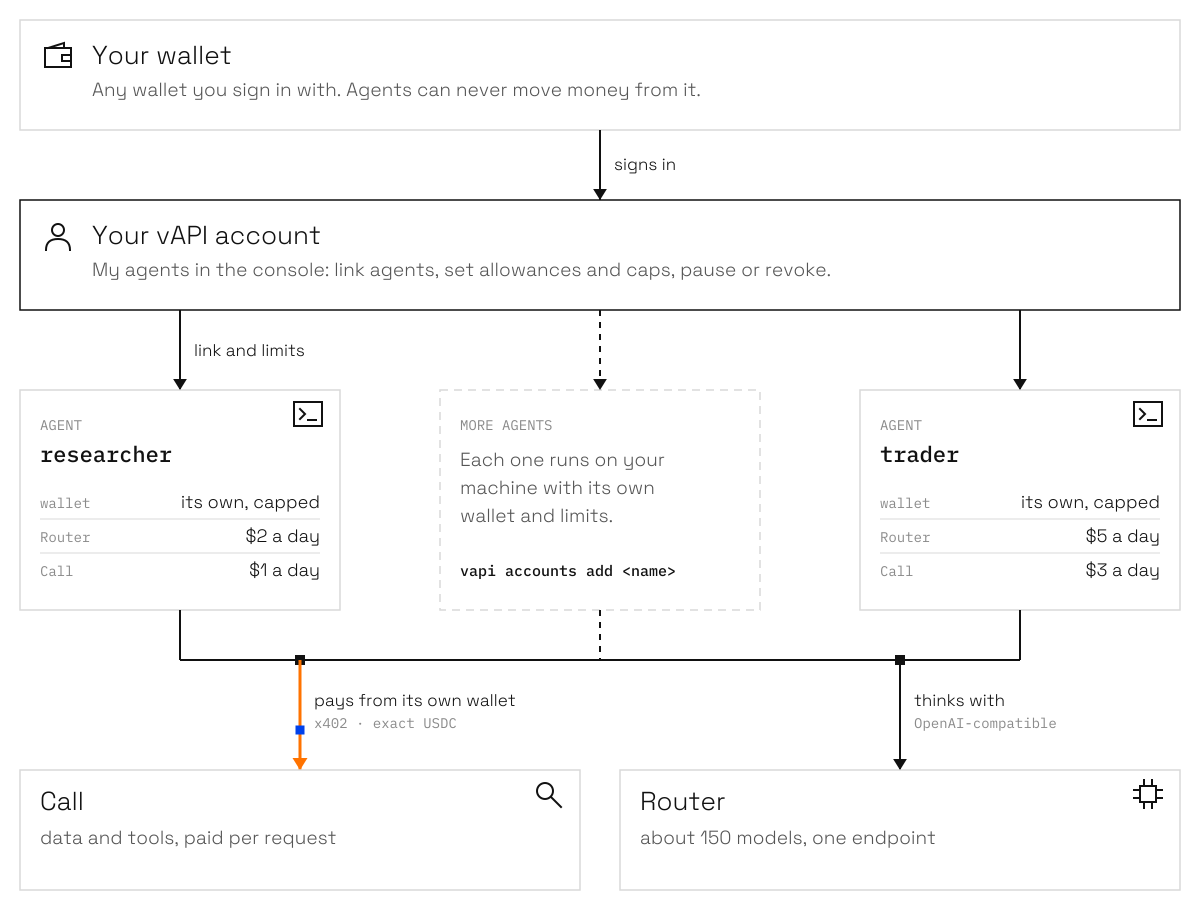
A vAPI agent is a small program that runs on your machine with its own capped wallet, linked to your vAPI account. It thinks with vAPI Router and pays for APIs on vAPI Call.
Agents think with Router and pay for APIs on Call from their own wallet. They can never move money from your wallet.
Status: Coming soon
## What you get
1. One place for thinking and doing: the agent's model calls go through vAPI Router, while its data and tools come from vAPI Call, all from one small wallet.
2. Your wallet stays yours: agents get rights on your account, never on your wallet.
3. Hard limits you set: per-call and per-day caps, a daily Router allowance, an approval threshold, and verified APIs by default.
4. Stake sets your daily Router usage limit, which also bounds your agents' Router use.
5. Buy more when you need it: Router balance is bought with USDC and never expires.
6. Works where you work: the same link serves the CLI, Claude, Cursor, or Codex over MCP, and your own code through the SDK.
7. Everything is on the record: you get receipts for every payment, an audit log, and **My agents** in the console.
Agents run on your own machines with their own wallets. They can use vAPI on your account within the limits you set. They can never move money from your wallet.
## For agents
Install the client:
```bash
npm i -g vapi-network
```
MCP provides namespaced tools such as `call.search`, `call.pay`, and `router.chat`. Account caps, Router allowances, and local run budgets limit their work.
## Next
* [Run your first agent](/agents/quickstart.md)
* [Owner and agents](/agents/control/owner-and-agents.md)
* [Limits and ceilings](/agents/wallets/limits-and-ceilings.md)
Checked on 2026-10-02.
---
# Agent Instructions
This documentation is published with GitBook. GitBook is the documentation platform designed so that both humans and AI agents can read, navigate, and reason over technical content effectively. Learn more at gitbook.com.
## Querying This Documentation
If you need additional information that is not directly available in this page, you can query the documentation dynamically by asking a question.
Perform an HTTP GET request on the current page URL with the `ask` query parameter, and the optional `goal` query parameter:
```
GET https://docs.vapinetwork.ai/agents/readme.md?ask=&goal=
```
`ask` is the immediate question: it should be specific, self-contained, and written in natural language.
`goal` is optional and describes the broader end goal you are ultimately trying to accomplish on behalf of the user. GitBook uses it to tailor the answer towards what is most useful for that goal.
The response will contain a direct answer to the question and relevant excerpts and sources from the documentation.
Use this mechanism when the answer is not explicitly present in the current page, you need clarification or additional context, or you want to retrieve related documentation sections.