> For the complete documentation index, see [llms.txt](https://docs.vapinetwork.ai/llms.txt). Markdown versions of documentation pages are available by appending `.md` to page URLs; this page is available as [Markdown](https://docs.vapinetwork.ai/agents/control/swarms.md).
# Swarms
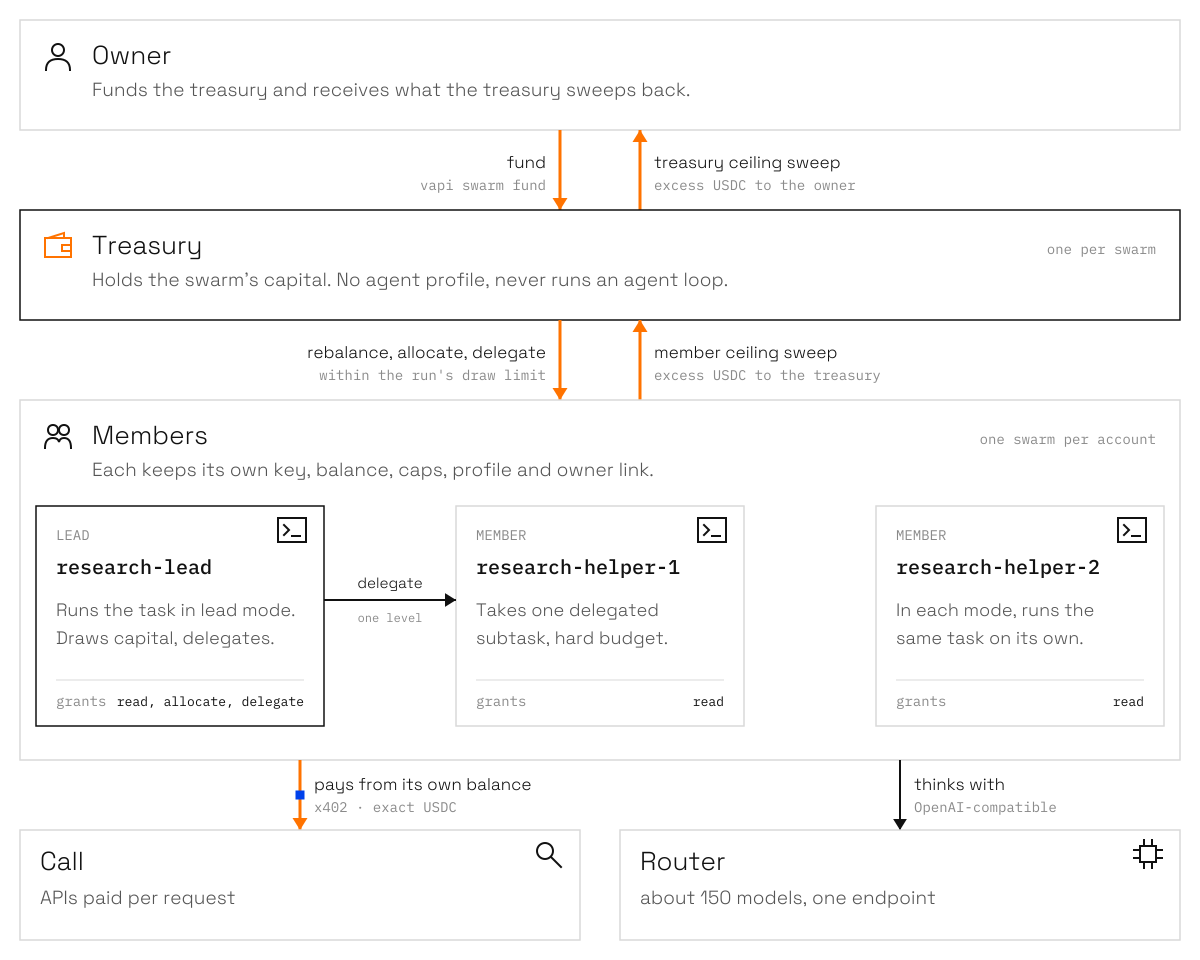
Local swarms group agent accounts around one treasury while each member keeps its own keys, balance, caps, and owner link.
{% hint style="info" %}
Agents is coming soon. This page describes how it works at launch.
{% endhint %}
This page is for owners who want several local agents to share one treasury without sharing keys or account limits.
A swarm groups local agent accounts around one treasury and one capital policy. Each member keeps its own key, balance, caps, profile, and owner link.
## Treasury and members
The treasury is a linked account that holds swarm capital. It has no agent profile and never runs an agent loop. Members spend their own balances on Call and Router.
Excess USDC sweeps up one level: members to the treasury, the treasury to the owner.
A member ceiling sweep returns excess USDC to the treasury. A treasury ceiling sweep returns excess to the owner. One local account can belong to at most one swarm.
## Create and manage a swarm
Create two default members, or name roles and fund the treasury during setup:
```bash
vapi swarm create research --agents 2
vapi swarm create research --roles lead,helper,helper --fund 5 --from main
```
The default allocation strategy is `targets`. The CLI also accepts `even` and `weights`. New member profiles use `venice/claude-sonnet-5` unless `--model ` selects another Router model.
Use the lifecycle commands as work changes:
```bash
vapi swarm add research reviewer
vapi swarm remove research research-helper-1
vapi swarm fund research 2 --from main
vapi swarm rebalance research
vapi swarm status research
vapi swarm dissolve research
```
Removing a member sweeps it to the treasury and keeps its account, key, and profile. Dissolving sweeps members to the treasury and the treasury to the owner. It removes the swarm file but keeps the accounts and profiles.
## Run the swarm
Lead mode is the default. It runs the lead, which can allocate treasury money to itself or delegate one level of work:
```bash
vapi swarm run research "Compare three weather APIs" --mode lead
```
Each mode gives the same task to every eligible member independently:
```bash
vapi swarm run research "Review the same dataset" --mode each
```
`--budget ` sets a hard Call-and-Router budget for each member run. Without it, a member uses the unspent remainder of its per-day cap. `--draw ` bounds the total treasury capital allocated or delegated during the run and defaults to $2.00.
The lead receives `read`, `allocate`, and `delegate` grants during setup. Other members receive `read`. `swarm.allocate` draws capital for the current member within the draw limit. `swarm.delegate` gives another member a subtask and hard budget. Delegation is one level deep.
## Run in the background
Start local detached work, list it, and stop one run or all runs:
```bash
vapi swarm run research "Compare three weather APIs" --mode each --detach
vapi swarm runs research
vapi swarm stop research
vapi swarm stop research --all
```
The local runtime writes secret-free run records under `~/.vapi/runs/` and output to `runs/.log`. A second active run for the same member is refused.
If a launcher stopped before it saved a worker reference, `vapi swarm runs` reports the stale start after five minutes. Confirm that the worker is gone before clearing its reservation:
```bash
vapi swarm stop --confirm-worker-stopped
```
This override is terminal-only and unavailable through MCP. Never confirm while the worker may still run.
## MCP tools
| Tool | What it does |
| ----------------- | -------------------------------------------------------------------------------------------------------- |
| `swarm.setup` | Creates or resumes the treasury, members, caps, profiles, links, and optional funding. |
| `swarm.add` | Adds or resumes one member. |
| `swarm.leave` | Sweeps and removes one member from the swarm. |
| `swarm.fund` | Funds the treasury or returns owner funding instructions. |
| `swarm.rebalance` | Moves funds between the treasury and members. |
| `swarm.status` | Reads balances, links, allocation totals (allocated, swept out, and net per member), and open movements. |
| `swarm.dissolve` | Sweeps the capital and removes the swarm file. |
| `swarm.run` | Runs the lead or each eligible member, attached or detached. |
| `swarm.runs` | Lists stored background runs and their latest status. |
`swarm.allocate` and `swarm.delegate` work only inside a swarm run. A direct MCP call to either tool is refused.
## Next
* [Owner and agents](/agents/control/owner-and-agents.md)
* [Sending and distributing](/agents/wallets/sending-and-distributing.md)
* [Limits and ceilings](/agents/wallets/limits-and-ceilings.md)
Checked on 2026-10-02.
---
# Agent Instructions
This documentation is published with GitBook. GitBook is the documentation platform designed so that both humans and AI agents can read, navigate, and reason over technical content effectively. Learn more at gitbook.com.
## Querying This Documentation
If you need additional information that is not directly available in this page, you can query the documentation dynamically by asking a question.
Perform an HTTP GET request on the current page URL with the `ask` query parameter, and the optional `goal` query parameter:
```
GET https://docs.vapinetwork.ai/agents/control/swarms.md?ask=&goal=
```
`ask` is the immediate question: it should be specific, self-contained, and written in natural language.
`goal` is optional and describes the broader end goal you are ultimately trying to accomplish on behalf of the user. GitBook uses it to tailor the answer towards what is most useful for that goal.
The response will contain a direct answer to the question and relevant excerpts and sources from the documentation.
Use this mechanism when the answer is not explicitly present in the current page, you need clarification or additional context, or you want to retrieve related documentation sections.