> For the complete documentation index, see [llms.txt](https://docs.vapinetwork.ai/llms.txt). Markdown versions of documentation pages are available by appending `.md` to page URLs; this page is available as [Markdown](https://docs.vapinetwork.ai/agents/in-your-ai-app/hosted-mcp.md).
# Remote MCP server for vAPI Network
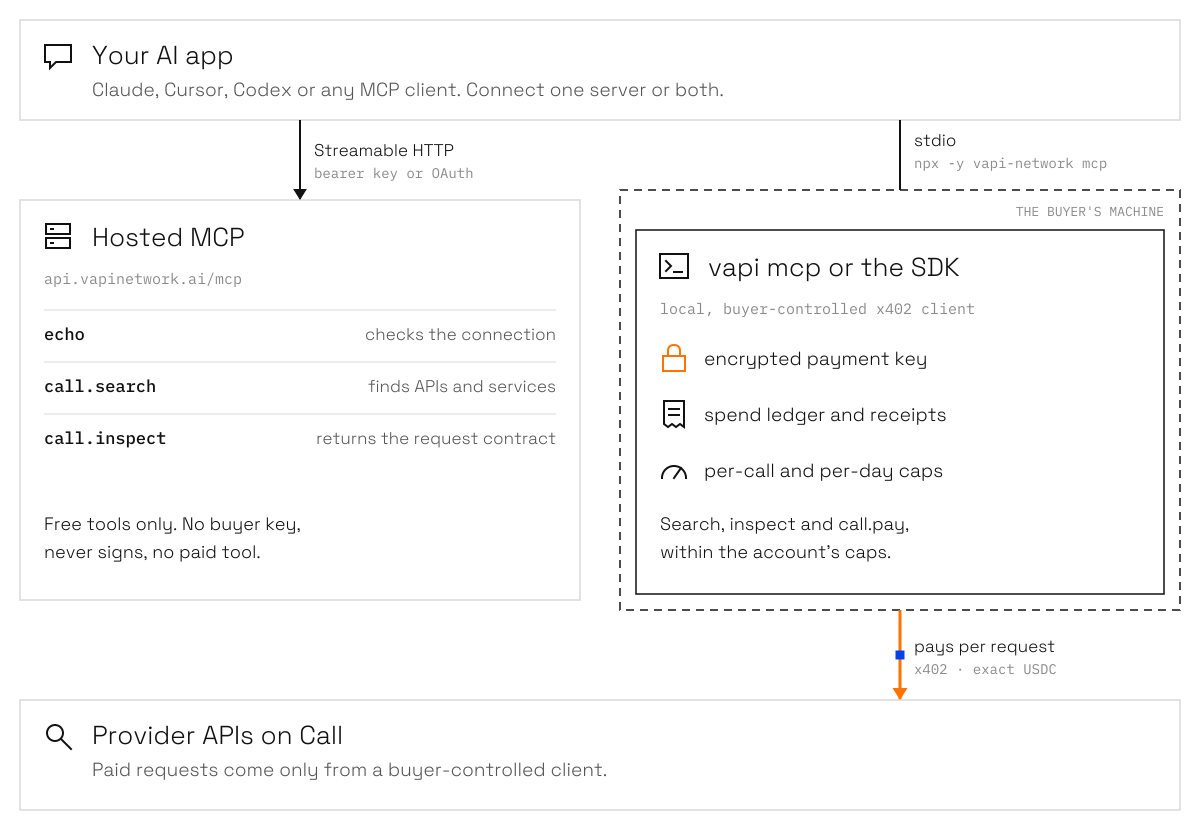
The vAPI Network remote MCP server uses Streamable HTTP for authenticated discovery; payment keys stay with the buyer.
{% hint style="info" %}
Agents is coming soon. This page describes how it works at launch.
{% endhint %}
The vAPI Network remote MCP server provides authenticated discovery over Streamable HTTP while payment keys stay with the buyer.
vAPI's hosted MCP gives authenticated clients free discovery tools over Streamable HTTP.
## Endpoint
The production MCP endpoint is:
```
https://api.vapinetwork.ai/mcp
```
The transport is stateless and uses bearer authentication. The public API also exposes a health probe:
```
https://api.vapinetwork.ai/mcp/health
```
Browser connectors use OAuth. Claude Code and direct bearer integrations may use a `vapi_sk_*` API key managed through Connect's Advanced section.
## Capabilities
The hosted server exposes three free tools:
| Tool | What it does |
| -------------- | -------------------------------------------------------- |
| `echo` | Verifies the connection. |
| `call.search` | Discovers marketplace APIs, services, and open requests. |
| `call.inspect` | Returns a listing's executable request contract. |
Hosted `call.inspect` accepts first-party Call API refs returned by `call.search`. Mirrored catalog and Work results cannot be inspected there.
The hosted server records per-tool usage. It does not provide the local client's wallet, receipt, or payment tools.
## Payments stay with the buyer
The hosted MCP never holds a buyer key and never signs for a buyer. It has no paid tool. To pay a provider, use a buyer-controlled x402 client, such as the local [`vapi mcp`](/agents/in-your-ai-app/use-vapi-in-claude-cursor-and-codex.md) server or the [SDK](https://docs.vapinetwork.ai/reference/sdk/sdk), from the buyer's own wallet.
The local server keeps the encrypted payment key, spend ledger, and caps on the buyer's machine. The hosted MCP only handles the free discovery and inspection surface.
Discovery can be hosted. Payment keys and signing stay on the buyer's machine. Orange marks where USDC moves.
## Next
* [Use vAPI in Claude, Cursor and Codex](/agents/in-your-ai-app/use-vapi-in-claude-cursor-and-codex.md)
* [SDK](https://docs.vapinetwork.ai/reference/sdk/sdk)
* [How wallets work](/agents/wallets/how-wallets-work.md)
Checked on 2026-10-02.
---
# Agent Instructions
This documentation is published with GitBook. GitBook is the documentation platform designed so that both humans and AI agents can read, navigate, and reason over technical content effectively. Learn more at gitbook.com.
## Querying This Documentation
If you need additional information that is not directly available in this page, you can query the documentation dynamically by asking a question.
Perform an HTTP GET request on the current page URL with the `ask` query parameter, and the optional `goal` query parameter:
```
GET https://docs.vapinetwork.ai/agents/in-your-ai-app/hosted-mcp.md?ask=&goal=
```
`ask` is the immediate question: it should be specific, self-contained, and written in natural language.
`goal` is optional and describes the broader end goal you are ultimately trying to accomplish on behalf of the user. GitBook uses it to tailor the answer towards what is most useful for that goal.
The response will contain a direct answer to the question and relevant excerpts and sources from the documentation.
Use this mechanism when the answer is not explicitly present in the current page, you need clarification or additional context, or you want to retrieve related documentation sections.