> For the complete documentation index, see [llms.txt](https://docs.vapinetwork.ai/llms.txt). Markdown versions of documentation pages are available by appending `.md` to page URLs; this page is available as [Markdown](https://docs.vapinetwork.ai/agents/wallets/how-wallets-work.md).
# How wallets work
A device vault holds separate local accounts with their own USDC balances, payment caps, and balance ceilings.
{% hint style="info" %}
Agents is coming soon. This page describes how it works at launch.
{% endhint %}
This page is for owners and builders who need to understand how one owner, one device vault, and several agent accounts fit together.
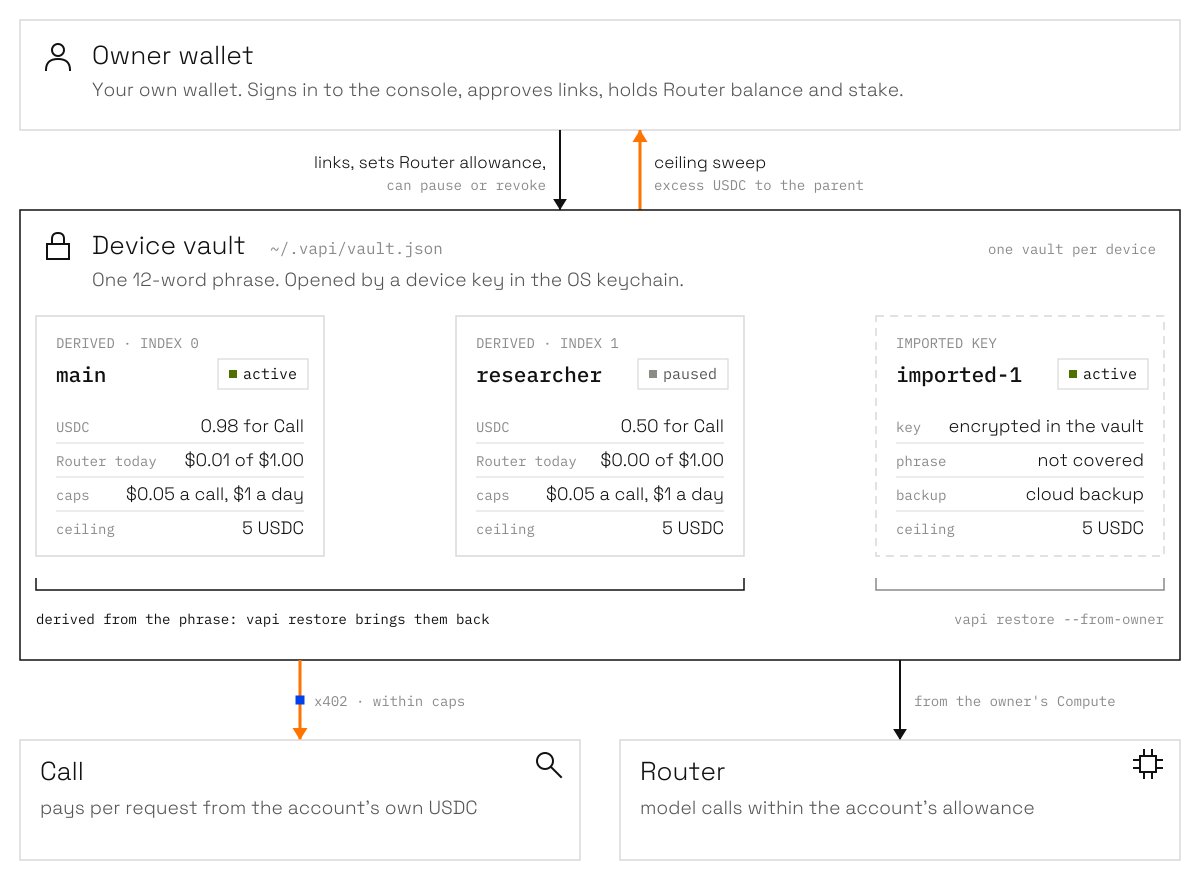
One owner wallet controls links and Router allowances. One device vault holds named accounts. Each account has its own USDC balance, spend caps, and balance ceiling.
The 0.8.0 preview keeps this vault model and adds cloud recovery, durable movements, and swarm state.
One owner, one vault per device, one wallet per account. Orange marks where USDC moves.
| Word | Meaning |
| --------- | ----------------------------------------------------------------------------------------------------------------- |
| Owner | Your own wallet. It signs in to the console, approves links, sets allowances, and holds Router balance and stake. |
| Vault | The encrypted file on one device that holds the phrase and accounts. Each device has one vault. |
| Account | An agent wallet inside the vault. It is derived from the phrase or imported. |
| Allowance | The Router budget per day that the owner grants one account. |
| Caps | The account's per-call and per-day spend limits, plus its Base USDC ceiling. |
| Balance | USDC held by an account for Call, or Router balance held by the owner. |
| Movement | A durable plan for one or more transfers, with each leg recorded before signing. |
## One vault per device
The vault at `~/.vapi/vault.json` holds one 12-word phrase and the accounts. Derived accounts use BIP-39 and the MetaMask path `m/44'/60'/0'/0/{index}`. Restoring the phrase into MetaMask produces the same derived addresses.
Create the vault and its first account:
```bash
vapi setup
```
List local accounts, add a derived account, or include read-only accounts on the owner's other devices:
```bash
vapi accounts
vapi accounts add
vapi accounts --all
```
Imported accounts keep an encrypted private key in the vault. The recovery phrase does not cover them.
```bash
vapi accounts import
```
The device key is generated at setup and stored in the operating system secret store. macOS uses Keychain, Windows uses Credential Manager, and Linux uses libsecret. The vault file cannot be opened without that device key.
## Servers and CI
Password protection wraps the device key under a password you choose. An unlocked session lasts eight hours.
```bash
vapi vault protect
vapi vault unlock
vapi vault status
vapi vault lock
vapi vault unprotect
```
Set `VAPI_VAULT_PASSWORD` for a non-terminal process. `VAPI_KEYSTORE_PASSWORD` is a deprecated alias.
## The status screen
Run `vapi` to see the owner, vault state, cloud-backup state, account balances, Router usage, caps, ceilings, and unfinished movements.
```bash
vapi
```
Each account has a 5 USDC Base ceiling by default. After a settled paid call and when the status screen opens, the account sends excess funds to its parent. A normal account's parent is the owner. A swarm member's parent is its treasury.
The per-day cap is the sweep floor. An account with a 5 USDC ceiling and an 8 USDC per-day cap sweeps down to 8 USDC.
## Backup and restore
Show the recovery phrase from a real terminal:
```bash
vapi backup
```
Phrase restore always rebuilds account 1. It discovers further accounts in order until the first address without Base USDC. Restore from the phrase:
```bash
vapi restore
```
After restore, add missing derived accounts again in order, including unfunded accounts beyond that gap:
```bash
vapi accounts add
```
Imported keys do not return from the phrase. An owner-encrypted cloud backup can include imported accounts and other device state.
```bash
vapi backup --cloud
vapi restore --from-owner
```
Read [Backup and recovery](/agents/wallets/backup-and-recovery.md) before restoring open movements. Keep recovery words away from websites, chats, and agent prompts.
## What the owner sees
The console's **My agents** page groups accounts by device. Each account shows its name, address, USDC balance, Router allowance, spending today, caps, and status.
The owner can change an allowance, pause an account, or revoke its link. The approval page names the device and account before the owner approves it.
For the account and device relationship, see [Owner and agents](/agents/control/owner-and-agents.md). For transfers and ceilings, see [Sending and distributing](/agents/wallets/sending-and-distributing.md).
## Coming from 0.5
The first 0.6.0 command migrated each `wallets/*.json` keystore into an imported vault account and moved the old files to `wallets.migrated/`. The 0.8.0 preview uses the account commands and `--account `.
```bash
vapi accounts
vapi accounts use
vapi pay --account
```
The old `vapi wallet` commands remain an alias of `vapi accounts`. The `--wallet` option still works for one more release; use `--account`.
## Next
* [Limits and ceilings](/agents/wallets/limits-and-ceilings.md)
* [Backup and recovery](/agents/wallets/backup-and-recovery.md)
* [Owner and agents](/agents/control/owner-and-agents.md)
Checked on 2026-10-02.
---
# Agent Instructions
This documentation is published with GitBook. GitBook is the documentation platform designed so that both humans and AI agents can read, navigate, and reason over technical content effectively. Learn more at gitbook.com.
## Querying This Documentation
If you need additional information that is not directly available in this page, you can query the documentation dynamically by asking a question.
Perform an HTTP GET request on the current page URL with the `ask` query parameter, and the optional `goal` query parameter:
```
GET https://docs.vapinetwork.ai/agents/wallets/how-wallets-work.md?ask=&goal=
```
`ask` is the immediate question: it should be specific, self-contained, and written in natural language.
`goal` is optional and describes the broader end goal you are ultimately trying to accomplish on behalf of the user. GitBook uses it to tailor the answer towards what is most useful for that goal.
The response will contain a direct answer to the question and relevant excerpts and sources from the documentation.
Use this mechanism when the answer is not explicitly present in the current page, you need clarification or additional context, or you want to retrieve related documentation sections.