> For the complete documentation index, see [llms.txt](https://docs.vapinetwork.ai/llms.txt). Markdown versions of documentation pages are available by appending `.md` to page URLs; this page is available as [Markdown](https://docs.vapinetwork.ai/reference/x402-on-vapi/x402.md).
# x402 payments and facilitator flow
An x402 facilitator verifies and settles buyer-signed USDC payments; vAPI Network clients keep signing and spending caps local.
An x402 facilitator verifies and settles buyer-signed payments. vAPI Network clients sign exact-USDC payments locally and enforce buyer spending caps.
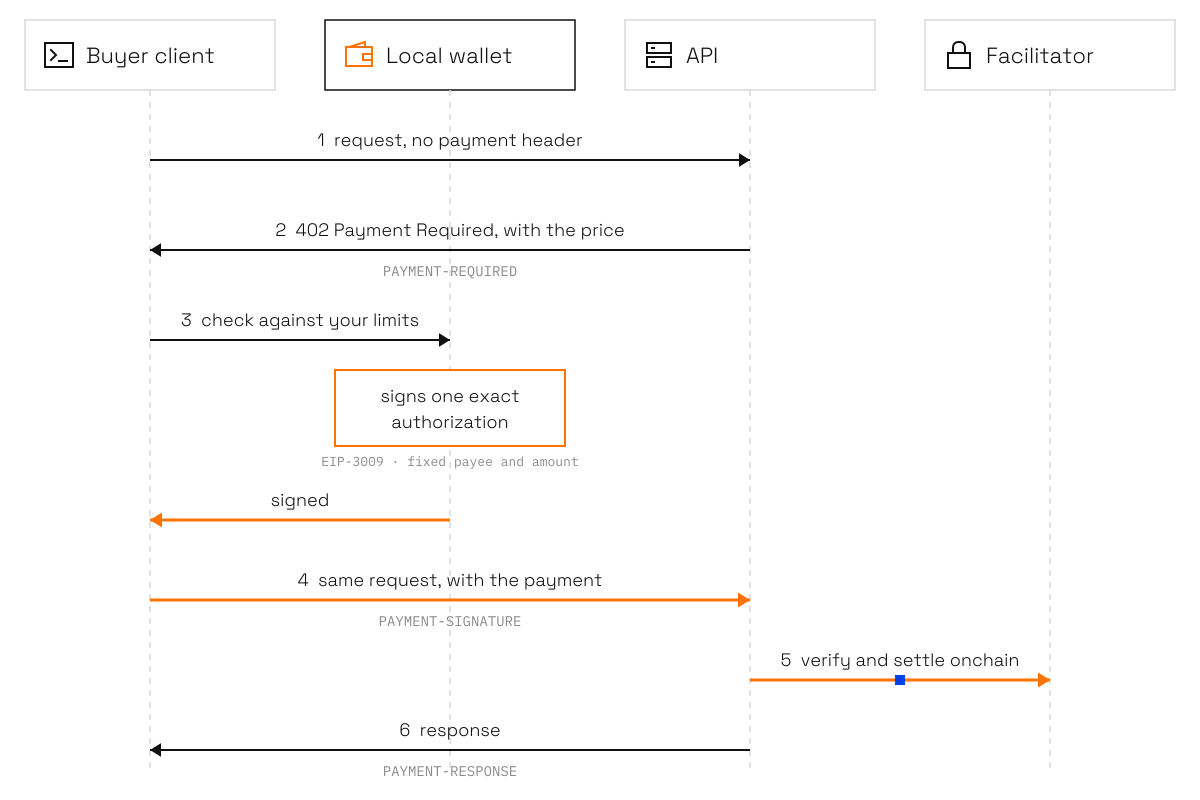
x402 is an HTTP payment flow for APIs. The API answers `402` with its price, the buyer signs a payment from their own wallet, and the same request is retried with the payment attached.
## Payment flow
One paid request. Only the local wallet signs, and only the exact amount.
1. Send the request without a payment header.
2. The API returns `402 Payment Required`. The offer is in the JSON body and the `PAYMENT-REQUIRED` header. A v2 header carries base64-encoded JSON.
```http
HTTP/1.1 402 Payment Required
PAYMENT-REQUIRED:
Content-Type: application/json
```
The offer identifies the resource, accepted scheme, network, USDC asset, amount, recipient, timeout, and EIP-3009 details.
```json
{
"x402Version": 2,
"resource": {
"url": "https://api.example.com/weather"
},
"accepts": [
{
"scheme": "exact",
"network": "eip155:8453",
"asset": "0x833589fCD6eDb6E08f4c7C32D4f71b54bdA02913",
"amount": "105",
"payTo": "0x1111111111111111111111111111111111111111",
"maxTimeoutSeconds": 30,
"extra": {
"name": "USD Coin",
"version": "2",
"assetTransferMethod": "eip3009"
}
}
]
}
```
3. The buyer client checks the live offer against its policy and signs an EIP-3009 `transferWithAuthorization` authorization. The authorization fixes the recipient, amount, chain, nonce, and validity window.
4. Retry the same request with the signed payment. x402 v2 uses `PAYMENT-SIGNATURE`. x402 v1 uses `X-PAYMENT`.
For x402 v2, the `PAYMENT-SIGNATURE` value is base64-encoded JSON. The payment payload includes the accepted offer, the signed authorization, and the extensions the API accepts.
```json
{
"x402Version": 2,
"accepted": {
"scheme": "exact",
"network": "eip155:8453",
"asset": "0x833589fCD6eDb6E08f4c7C32D4f71b54bdA02913",
"amount": "105",
"payTo": "0x1111111111111111111111111111111111111111",
"maxTimeoutSeconds": 30,
"extra": {
"name": "USD Coin",
"version": "2",
"assetTransferMethod": "eip3009"
}
},
"payload": {
"signature": "0x...",
"authorization": {
"from": "0xFCAd0B19bB29D4674531d6f115237E16AfCE377c",
"to": "0x1111111111111111111111111111111111111111",
"value": "105",
"validAfter": "0",
"validBefore": "1700000030",
"nonce": "0x..."
}
},
"extensions": {
"builder-code": {
"info": {
"s": ["vapi"]
}
}
}
}
```
5. An x402 facilitator verifies and settles the payment. The API then returns its response. When settlement evidence is returned, x402 v2 uses the `PAYMENT-RESPONSE` header with base64-encoded JSON. The legacy form is `X-PAYMENT-RESPONSE` with JSON.
```json
{
"success": true,
"payer": "0xFCAd0B19bB29D4674531d6f115237E16AfCE377c",
"transaction": "0xaaaaaaaaaaaaaaaaaaaaaaaaaaaaaaaaaaaaaaaaaaaaaaaaaaaaaaaaaaaaaaaa",
"network": "eip155:8453",
"amount": "105"
}
```
The live 402 offer is authoritative. Stored listing data can become stale before you sign.
## Supported payments
vAPI supports the `exact` scheme with EIP-3009 `transferWithAuthorization` in USDC on these networks. Arc mainnet support was added to the `vapi` client in version 0.5.0.
| Network | x402 identifier |
| ----------- | --------------- |
| Base | `eip155:8453` |
| Arc mainnet | `eip155:5042` |
Buyer network support is separate from provider self-listing. FeeSplitter self-listing is Base-only; there is no Arc-mainnet self-listing factory. See [List your API](https://docs.vapinetwork.ai/call/for-providers/list-your-api) for the Base payout flow.
Base is enabled by default. Enable Base and Arc mainnet when you initialize the client with `vapi init --networks base,arc`, or add Arc to an existing wallet with `vapi accounts --enable arc`. Arc uses `https://rpc.mainnet.arc.io` by default, and `ARC_RPC_URL` overrides it.
An Arc sweep keeps 0.05 USDC in the account for gas by default. Set `VAPI_ARC_GAS_HEADROOM_USDC` to change that amount. Sweep receipts link to the transaction on `https://explorer.arc.io`.
External listings can show `upto` and `auth-capture` offers. They are not payable through vAPI. vAPI pays `exact` offers only.
## MPP listings
vAPI Call can list an API whose 402 response uses a `WWW-Authenticate: Payment` challenge from Stripe/Tempo's Machine Payments Protocol. The directory labels it "MPP (Stripe/Tempo), not payable here."
`vapi check` passes the `transport` rule with the `mpp` tag and sets the JSON report's `transport` field to `mpp`. The `vapi` client recognizes these listings but cannot pay them.
## Extensions
Every payment made by the console and the `vapi` client carries the `builder-code` extension. Routing codes live at `extensions['builder-code'].info`; the `s` array contains `vapi` as routing proof.
When an API advertises the `payment-identifier` extension, the client sends the identifier at `extensions['payment-identifier'].info.id`. Use it when you need safe retries. The same identifier and request fingerprint can return the cached response without a second settlement. Reusing an identifier for a different request returns `409`.
## Network fee
Self-listed `Added` APIs use the provider's own `FeeSplitter` on Base. The splitter applies a 5% network fee. A `Partner` added through the website uses a `FeeSplitter` and pays 5%. A `Partner` on direct payout and `External` listings have no network fee.
## Next
* [x402 contracts](/reference/x402-on-vapi/contracts.md)
* [Check an x402 API](https://docs.vapinetwork.ai/call/for-providers/check-an-x402-api)
* [Networks and schemes](https://docs.vapinetwork.ai/call/reference/networks-and-schemes)
Checked on 2026-10-02.
---
# Agent Instructions
This documentation is published with GitBook. GitBook is the documentation platform designed so that both humans and AI agents can read, navigate, and reason over technical content effectively. Learn more at gitbook.com.
## Querying This Documentation
If you need additional information that is not directly available in this page, you can query the documentation dynamically by asking a question.
Perform an HTTP GET request on the current page URL with the `ask` query parameter, and the optional `goal` query parameter:
```
GET https://docs.vapinetwork.ai/reference/x402-on-vapi/x402.md?ask=&goal=
```
`ask` is the immediate question: it should be specific, self-contained, and written in natural language.
`goal` is optional and describes the broader end goal you are ultimately trying to accomplish on behalf of the user. GitBook uses it to tailor the answer towards what is most useful for that goal.
The response will contain a direct answer to the question and relevant excerpts and sources from the documentation.
Use this mechanism when the answer is not explicitly present in the current page, you need clarification or additional context, or you want to retrieve related documentation sections.