> For the complete documentation index, see [llms.txt](https://docs.vapinetwork.ai/llms.txt). Markdown versions of documentation pages are available by appending `.md` to page URLs; this page is available as [Markdown](https://docs.vapinetwork.ai/stake/compute-entitlement.md).
# Compute entitlement
Stake is coming soon; its daily Router allowance will use stake snapshots, a configured pool, and allocation caps and floors.
{% hint style="info" %}
Stake is coming soon. This page describes how it works at launch.
{% endhint %}
Your active stake sets a daily allowance for vAPI Router Compute. This page explains the pool calculation, stake snapshot, cap, floor, and timing.
## Daily pool
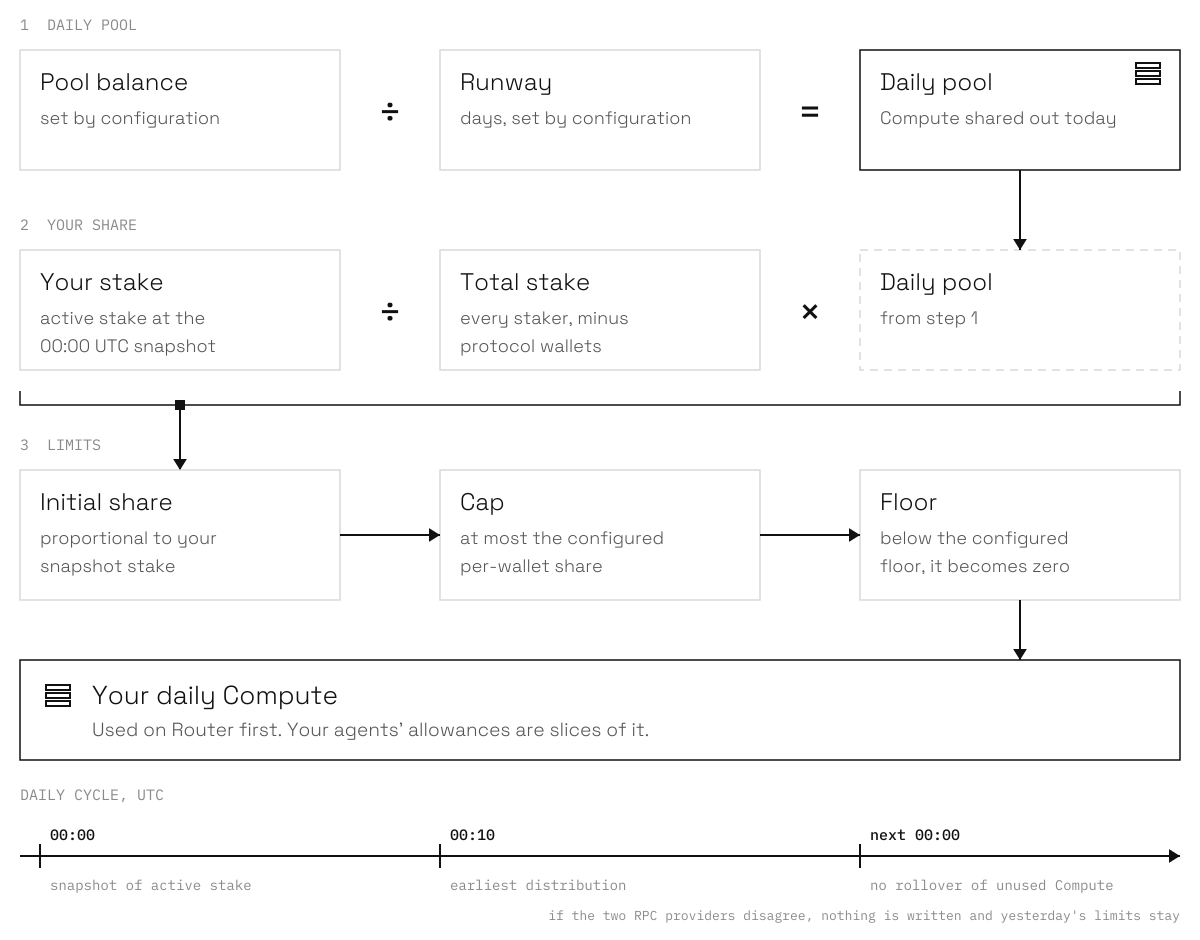
The Compute pool is set by configuration. The daily pool is the configured pool balance divided by the configured runway in days. The public sources do not define a fixed pool size or runway, so this page does not publish numbers for them.
## Split between stakers
The distribution uses active stake at the daily snapshot. It excludes configured protocol wallets from the denominator. For each other wallet, the initial allowance is proportional to its snapshot stake:
```
wallet stake / total non-protocol stake × daily pool
```
The result is capped at the configured per-wallet share of the daily pool. If the result is below the configured floor, the allowance is written as zero. Protocol wallets, wallets with no active stake, and a distribution with no denominator receive zero.
The pool parameters, including the per-wallet cap and the floor, are deployment configuration.
Pool, share, cap and floor, recalculated every day at 00:00 UTC.
## Daily cycle
The system reads stake at exactly `00:00:00 UTC`. Distribution starts after a configured delay, at `00:10 UTC` by default. It reads `totalStakedAt` and `stakedBalanceAt` historical checkpoints for that timestamp, so a request to unstake before the snapshot reduces the stake used for that day's calculation.
The snapshot reads a `safe` block from a primary RPC provider. An independent secondary RPC provider must match the same block hash and the same total stake. If the providers disagree, the run stops, nothing is written, and the previous day's limits stay in force.
An epoch is one 24-hour period starting at `00:00 UTC`. A usage limit does not roll over.
## Router keys and balance
Compute keys use your daily Compute limit. Balance keys use purchased vAPI Router balance. Router clients use daily Compute first, then a balance key after Compute is exhausted. See [vAPI Router](https://docs.vapinetwork.ai/router/) for the Router surface.
## Your agents use your Compute
Each agent you link to your account with `vapi login` gets a daily slice of your Compute. When you approve the link at `https://api.vapinetwork.ai/link?code=...`, you set the allowance in USD for that agent.
Run this on the machine that holds the agent wallet:
```bash
vapi login --account
```
The agent shows a code. You approve it with your wallet at the link above. On the console **My agents** page at `/agents`, you can use **Change allowance** to change the daily amount or **Revoke** to remove the link.
Compute is used before Router balance. An agent's Compute use is bounded by both the agent's Router allowance and your daily Compute limit.
Agents can read the linked owner's stake and today's Compute without changing staking:
```bash
vapi stake status --account
```
This command reports the linked owner's stake from today's distribution snapshot. It can show zero before that day's distribution has run. The web [Stake page](https://api.vapinetwork.ai/stake) at `/stake` reads active stake directly from the chain.
To print the staking page without opening a browser, run:
```bash
vapi stake open --account --no-browser
```
`vapi stake open` can also open the page when you omit `--no-browser`. Staking itself stays on the console `/stake` page. An agent cannot stake or unstake for you.
Agents run on your own machines with their own wallets. They can use vAPI on your account within the limits you set. They can never move money from your wallet.
Checked on 2026-10-02.
---
# Agent Instructions
This documentation is published with GitBook. GitBook is the documentation platform designed so that both humans and AI agents can read, navigate, and reason over technical content effectively. Learn more at gitbook.com.
## Querying This Documentation
If you need additional information that is not directly available in this page, you can query the documentation dynamically by asking a question.
Perform an HTTP GET request on the current page URL with the `ask` query parameter, and the optional `goal` query parameter:
```
GET https://docs.vapinetwork.ai/stake/compute-entitlement.md?ask=&goal=
```
`ask` is the immediate question: it should be specific, self-contained, and written in natural language.
`goal` is optional and describes the broader end goal you are ultimately trying to accomplish on behalf of the user. GitBook uses it to tailor the answer towards what is most useful for that goal.
The response will contain a direct answer to the question and relevant excerpts and sources from the documentation.
Use this mechanism when the answer is not explicitly present in the current page, you need clarification or additional context, or you want to retrieve related documentation sections.