Three ways to use vAPI
The vapi-network CLI, local MCP server, and TypeScript SDK share one local wallet, payment limits, and receipts.
Tasks, Router, Stake, Call and Agents are live. Tasks settles USDC on Base mainnet.
This page helps you choose between the terminal, your AI app, and your own code.
Client 0.16.0 supports Tasks V2 through the CLI, local tasks.* MCP tools and the SDK Tasks namespace. Some actions still need the hosted MCP or web app; see Tasks.
All three are the same open-source client. They share one local wallet, the same limits, and the same receipts, so you can start with one and add another later.
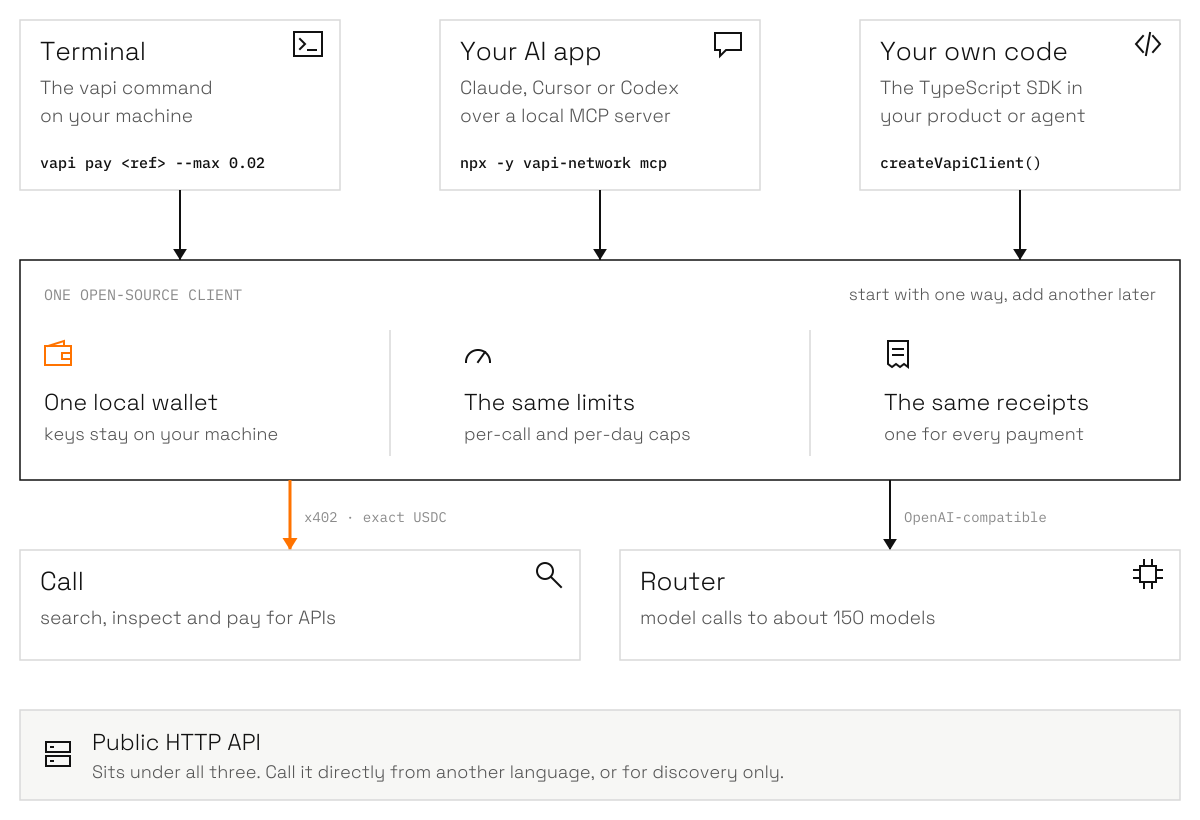
Three ways in, one client underneath.
| Way | What it is | Pick it when | First step |
|---|---|---|---|
| Terminal | The vapi command on your machine. |
You want direct control or a command you can script. | Quickstart |
| Your AI app | The local MCP server for Claude, Cursor, or Codex. | You want an assistant to use Tasks, Router and Call within your limits. | Use vAPI in Claude, Cursor and Codex |
| Your own code | The TypeScript SDK. | You are adding vAPI to a product or a custom agent. | SDK |
In Claude Desktop, MCP search and inspection support interactive results. For hosted discovery, use Add to Claude on Connect; payments use the local client. vAPI Desktop has no released installer.
The public HTTP API sits under all three. Call it directly when you work in another language or only need discovery.
Give your agent one line with Start with your agent.
Continue with these guides.
| Guide or feature |
|---|
| Quickstart |
| Call quickstart: the same first call on every path |
| Use vAPI in Claude, Cursor and Codex |
| Open source |
Checked on 2026-11-24.